Practical SQL – Last non-direct click attribution via SQL data interpolation
Fill gaps in your data, with a sprinkle of SQL window function magic

Use case
You have a table of time series user events like this, and you want to perform an attribution analysis of your conversion events.
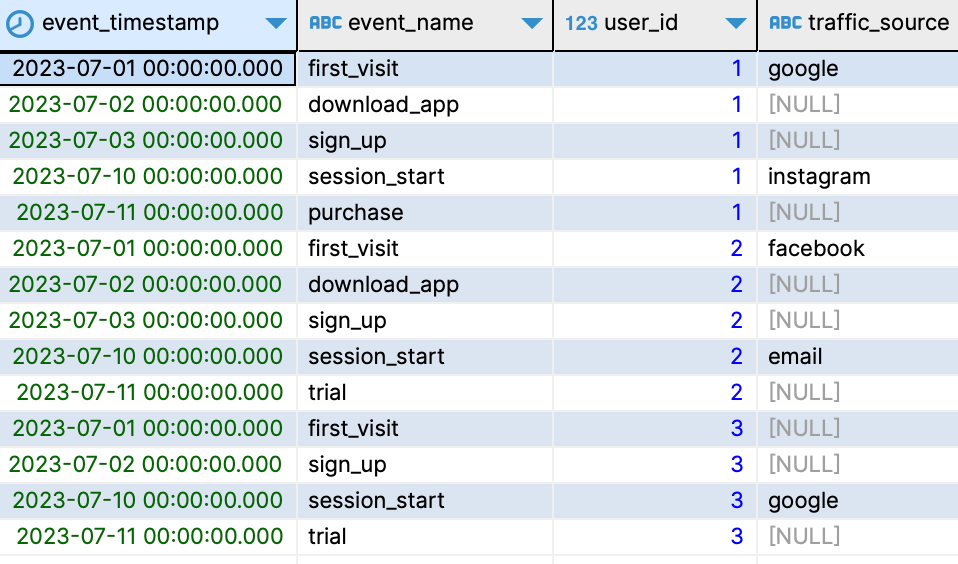
The problem: a conversion event itself usually contains no attribution data, as they are rarely the first event generated by inbound traffic, so you need to go back and find the last non-direct traffic acquisition source that led to your conversion event.
Solution – SQL data interpolation
To figure out the last non-direct source of your conversions, it’s as easy as performing an SQL linear data interpolation using a method called Last Observation Carried Forward (LOCF). With LOCF, you take the last known value in your data and use it to fill in any subsequent gaps in the data.
SQL code
with
  -- sample data start
  event as (
    select *
    from
      (
        values (timestamp '2023-07-01', 'first_visit', 1, 'google')
        , (timestamp '2023-07-02', 'download_app', 1, null)
        , (timestamp '2023-07-03', 'sign_up', 1, null)
        , (timestamp '2023-07-10', 'session_start', 1, 'instagram')
        , (timestamp '2023-07-11', 'purchase', 1, null)
        , (timestamp '2023-07-01', 'first_visit', 2, 'facebook')
        , (timestamp '2023-07-02', 'download_app', 2, null)
        , (timestamp '2023-07-03', 'sign_up', 2, null)
        , (timestamp '2023-07-10', 'session_start', 2, 'email')
        , (timestamp '2023-07-11', 'trial', 2, null)
        , (timestamp '2023-07-01', 'first_visit', 3, null)
        , (timestamp '2023-07-02', 'sign_up', 3, null)
        , (timestamp '2023-07-10', 'session_start', 3, 'google')
        , (timestamp '2023-07-11', 'trial', 3, null)
      ) as events (
        event_timestamp
        , event_name
        , user_id
        , traffic_source
      )
  )
  -- sample data end
  , event_source_partition as (
    select
      count(traffic_source) over (
        partition by user_id
        order by event_timestamp
      ) as source_partition_id
      , *
    from
      event
  )
  , event_first_source as (
    select
      first_value(traffic_source) over (
        partition by user_id, source_partition_id
        order by event_timestamp
      ) as first_source
      , *
    from
      event_source_partition
  )
select
  event_timestamp
  , event_name
  , user_id
  , traffic_source
  , first_source
from
  event_first_source
;
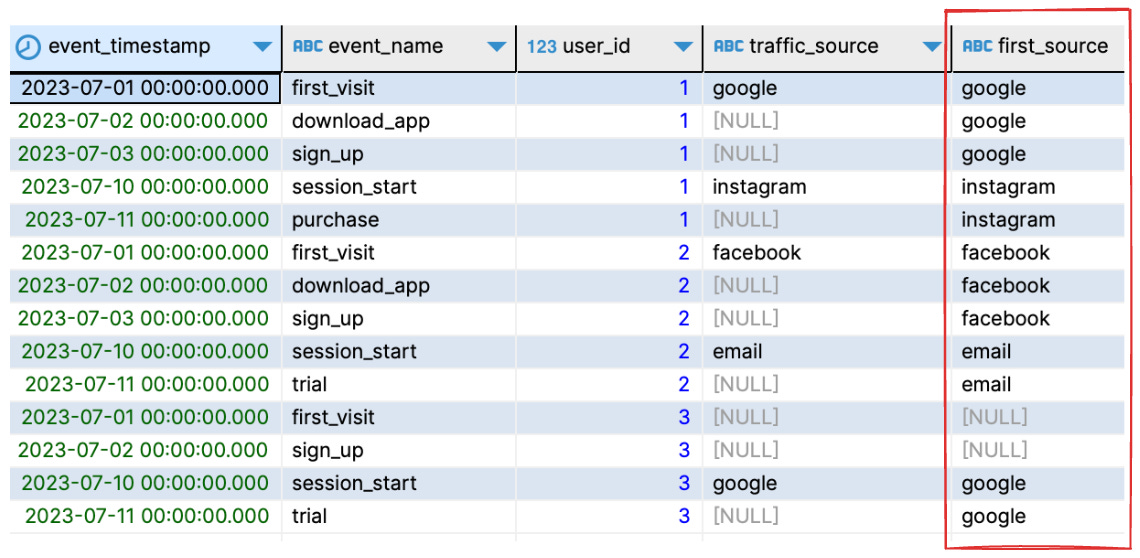
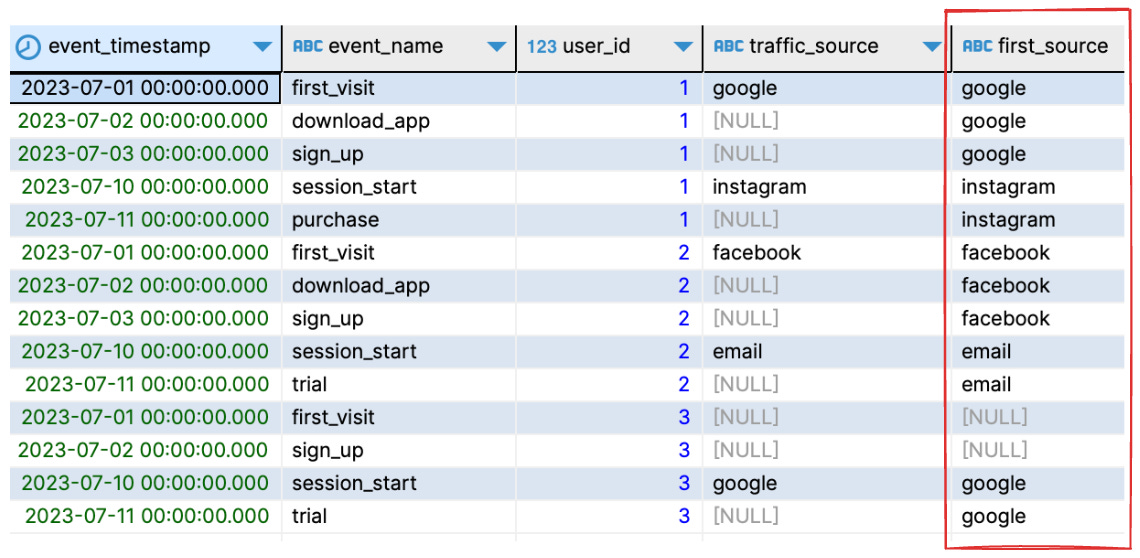
Tada! Running the SQL above produces the following result:
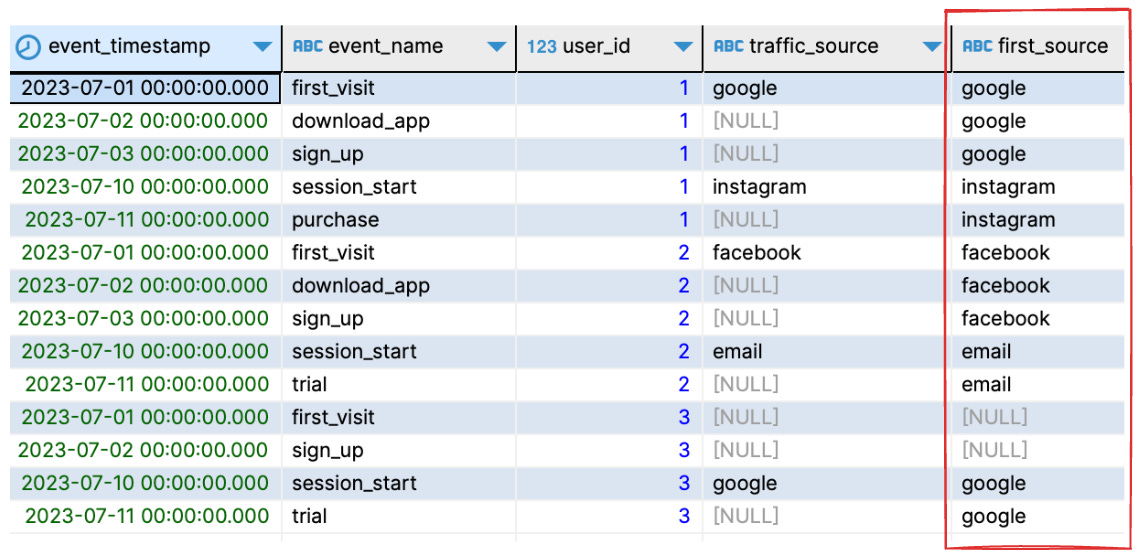
first_source contains LOCF interpolated dataNow, each of your conversion events has an associated first_source column that allows you to easily attribute your conversions.
Step-by-step breakdown
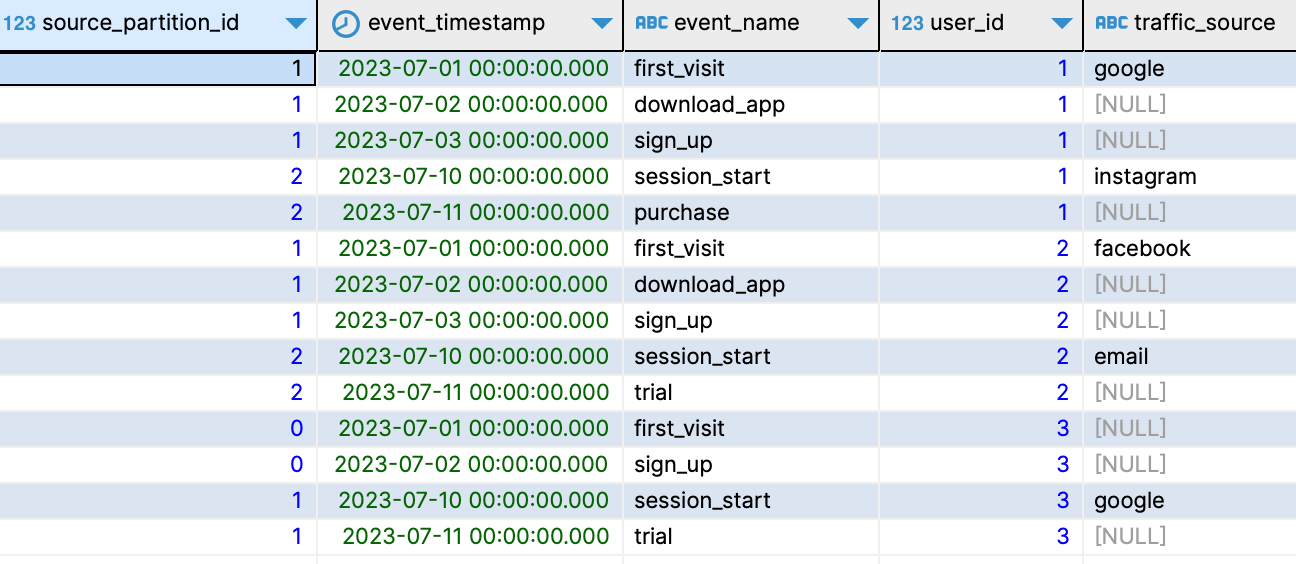
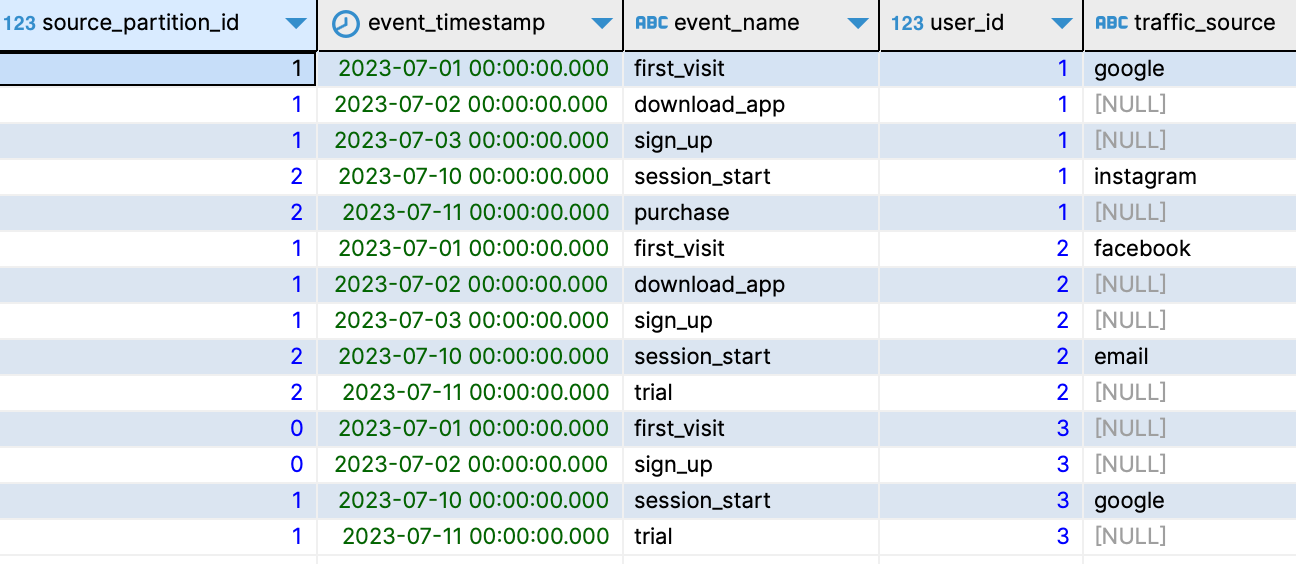
Partition your data by user, and then tag each distinct traffic source in a user partition. All subsequent rows in a user partition should carry the same tag until the traffic source changes.
The easiest way to accomplish this is by leveraging SQL’s
countfunction:... , event_source_partition as ( select count(traffic_source) over ( partition by user_id order by event_timestamp ) as source_partition_id , * from event ) ...This produces the following table:
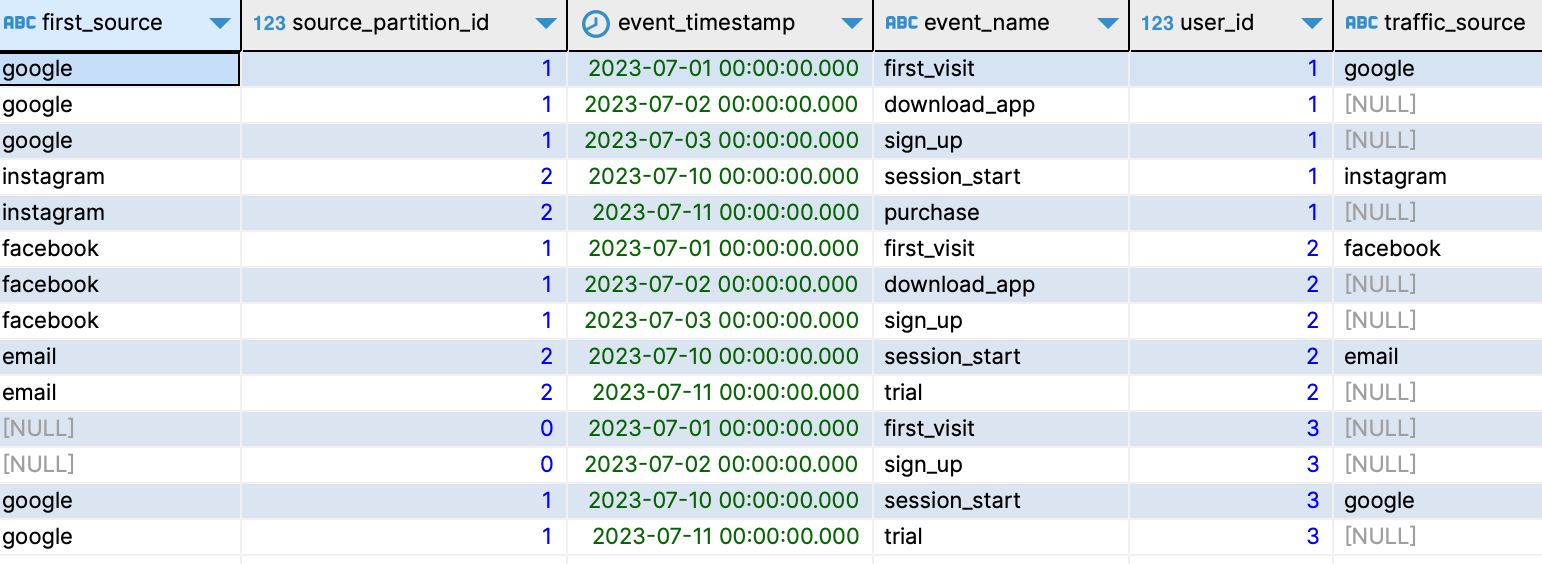
Partition your data again, this time by user and the new
source_partition_idcolumn. Now that you have the right partitions in place, it’s just a question of filling the gaps using the first value of each partition:... , event_first_source as ( select first_value(traffic_source) over ( partition by user_id, source_partition_id order by event_timestamp ) as first_source , * from event_source_partition ) ...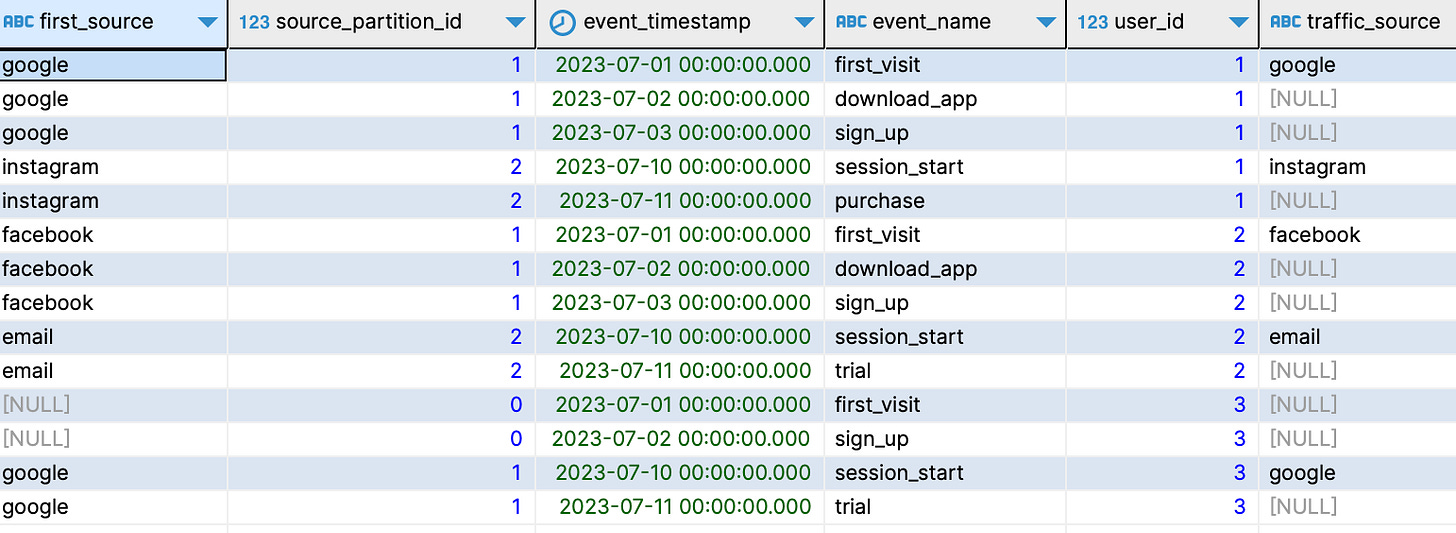
All that’s left now is hiding the auxiliary columns generated in the intermediate steps in your final result table:
...

select
  event_timestamp
  , event_name
  , user_id
  , traffic_source
  , first_source
from
  event_first_source
;